Nhân dịp ra mắt website mới, Hoàng Hải Mobile liên tục triển khai các hoạt động khuyến mãi, giảm giá sâu cho các đơn hàng đặt tại website https://hoanghaimobile.jp/
Để có thể mua được sản phẩm với giá tốt hơn so với mua trực tiếp tại cửa hàng hoặc thông qua fanpage, quý khách vui lòng đăng ký tài khoản và tiến hành đặt hàng theo hướng dẫn bên dưới:
I. Đăng ký tài khoản
Bước 1: Truy cập https://hoanghaimobile.jp/
Bước 2: Bấm vào biểu tượng hình người ở góc trên bên phải

Bước 3: Bấm vào link “Tạo tài khoản"

Bước 4: Nhập đầy đủ thông tin cá nhân và bấm "Tạo tài khoản"
Bước 5: Sau khi tạo tài khoản sẽ có email thông báo thành công, quý khách vui lòng kiểm tra email để nhận các Mã giảm giá

II. Đặt hàng và áp dụng mã giảm giá
Bước 1: Lựa chọn sản phẩm muốn mua, bấm "Mua ngay"
Bước 2: Tiếp tục bấm "Xem giỏ hàng"
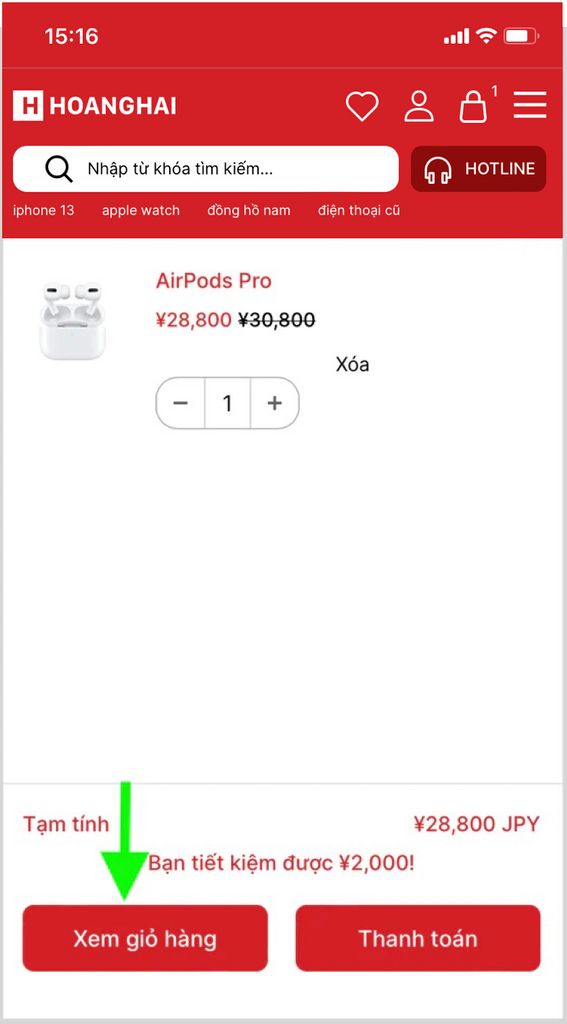
Bước 3: Tại trang giỏ hàng, vui lòng chọn thời gian nhận hàng và ghi chú nếu có (Ví dụ muốn shop đóng hàng kiểu hộp quà, kèm thiệp chúc mừng...)

Bước 4: Quý khách tiếp tục nhập các thông tin liên quan như lựa chọn nơi nhận hàng, địa chỉ và thông tin người nhận hàng.

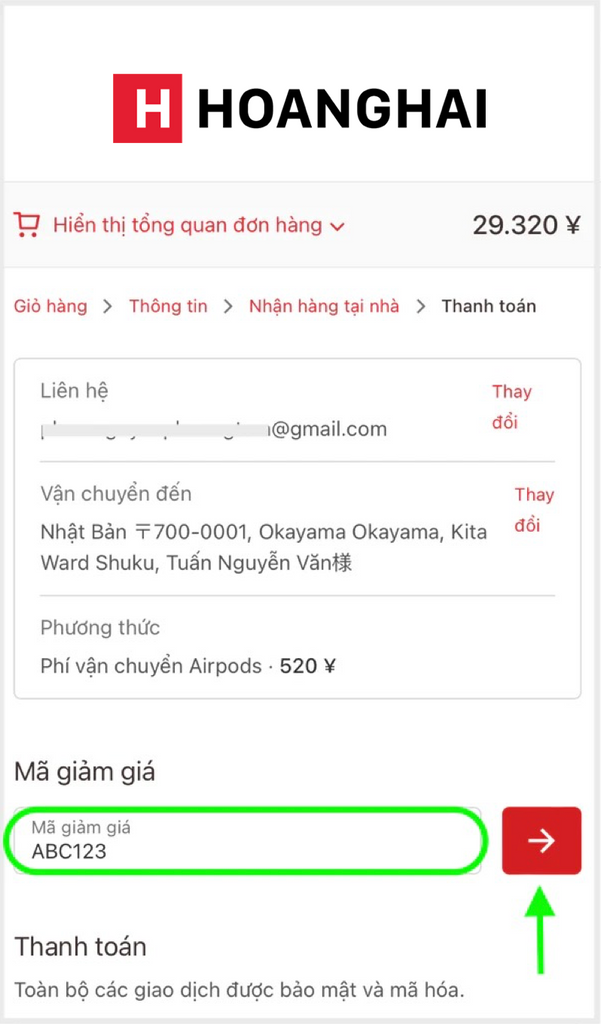
Bước 5: Sau khi nhập hết thông tin nhận hàng, chuyển sang phần thanh toán, quý khách có thể nhập mã giảm giá tại đây.
Lưu ý: Sau khi nhập mã giảm giá, vui lòng bấm nút mũi tên đỏ để hệ thống áp dụng mã (xem hình dưới)
Bước 6: Chọn hình thức thanh toán. Tại website Hoàng Hải, chúng tôi cung cấp 2 hình thức thanh toán thuận tiện

1. Thanh toán Daibiki: (quý khách vui lòng thanh toán thêm 1500 Yen cho hình thức này). Sau khi đặt đơn hàng, quý khách nhắn tin tới fanpage của Hoàng Hải hoặc địa chỉ email info@hoanghaimobile.jp để xác nhận đơn hàng một lần nữa.
2. Thanh toán chuyển khoản: Khi thực hiện chuyển khoản, quý khách vui lòng đổi tên người gửi thành mã đơn hàng để Hoàng Hải có thể kiểm tra thanh toán nhanh nhất. Cụ thể:
- Sau khi bấm thanh toán, đơn hàng mới sẽ được tạo với mã đơn hàng như bên dưới. Quý khách sử dụng mã đơn hàng này cho bước chuyển khoản tiếp theo.

- Chuyển khoản tại cây ATM: Ở phần tên người chuyển, đổi tên người chuyển thành mã đơn hàng
- Chuyển khoản thông qua internet banking: Tương tự, phần tên người chuyển đổi thành mã đơn hàng.
Sau khi chuyển khoản thành công, quý khách vui lòng gửi hình chụp hoá đơn chuyển khoản qua email info@hoanghaimobile.jp hoặc fanpage của Hoàng Hải để chúng tôi xác nhận trong thời gian sớm nhất.
Bước 7: Hoàn tất thanh toán.
Quý khách sẽ nhận được thông báo đơn hàng thành công trên website cũng như email. Đối với trường hợp thanh toán Daibiki và chuyển khoản ngân hàng, chúng tôi sẽ kiểm tra và xác nhận thông tin trong thời gian sớm nhất (tối đa 24h).
Bước 8: Tra cứu đơn hàng
Khi đơn hàng bắt đầu được gửi đi, sẽ có email thông báo kèm đường link tra cứu mã vận đơn, quý khách có thể dễ dàng theo dõi tình trạng của đơn hàng cho đến khi nhận được hàng.

Cảm ơn quý khách đã ủng hộ Hoàng Hải, hi vọng quý khách có được trải nghiệm mua sắm tiện lợi trên website https://hoanghaimobile.jp