Bạn đang sử dụng dịch vụ wifi cố định của nhà mạng Softbank nhưng không hài lòng nên muốn đổi sang nhà mạng khác? Bạn sắp sửa về nước hoặc chuyển nhà nên không còn nhu cầu sử dụng nữa? Rất đơn giản, bạn có thể tự thực hiện việc huỷ hợp đồng thông qua điện thoại vô nhanh chóng và tiện lợi. Chi tiết như bên dưới:
I. Những thông tin cần chuẩn bị trước khi gọi huỷ hợp đồng
- Số điện thoại lúc đăng ký wifi cố định
- Số tài khoản My Softbank (số SSID): Đây là mã số do nhà mạng cung cấp sau khi đăng ký thành công wifi cố định, thường được gửi kèm với hợp đồng giấy.

- Cần nghe hiểu được tiếng Nhật và nói lại được các thông tin nhà mạng yêu cầu. Trường hợp bạn không biết tiếng Nhật, có thể liên hệ nhân viên Hoàng Hải để được hỗ trợ. Hoàng Hải Mobile có dịch vụ tiếp nhận và xử lý tất cả các vấn đề liên quan đến wifi cố định từ nhà mạng Softbank, không nhất thiết khách hàng phải đăng ký lắp đặt wifi cố định tại Hoàng Hải Mobile mới được hỗ trợ.
II. Các bước thực hiện huỷ hợp đồng wifi cố định qua điện thoại
Bước 1: Gọi lên tổng đài của nhà mạng Softbank theo số: 080-0111-2009
Bạn sẽ nghe hướng dẫn bấm các phím số để được hỗ trợ dịch vụ tương ứng. Theo đó, bạn ấn phím 3 để đến cổng hỗ trợ wifi cố định, tiếp tục ấn phím 2 để đến cổng hỗ trợ hủy wifi.

Bước 2: Nhập số điện thoại lúc đăng kí wifi và bấm phím #. Tổng đài sẽ yêu cầu xác nhận lại số điện thoại vừa nhập.
- Nếu số điện thoại đã đúng: Ấn phím 1
- Nếu số điện thoại lỡ nhập sai, muốn nhập lại: Ấn phím 5

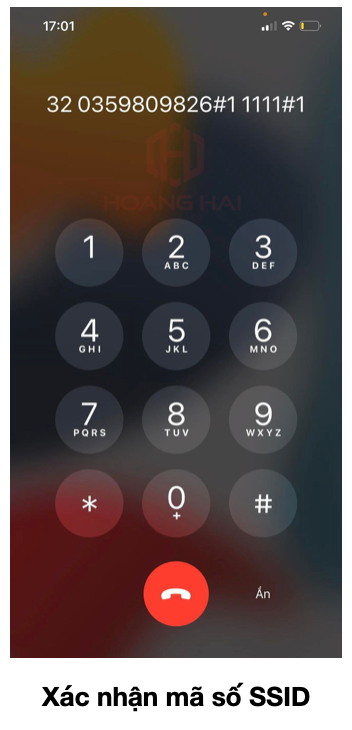
Bước 3: Nhập 4 số cuối tài khoản my Softbank (số SSID) đã chuẩn bị ở trên và bấm phím #. Tổng đài sẽ yêu cầu xác nhận
- Nếu số SSID đã điền đúng: Ấn phím 1
- Nếu số SSID lỡ nhập sai, muốn nhập lại: Ấn phím 5
Bước 4: Chờ nhân viên nhà mạng nghe máy để xác nhận lại thông tin cá nhân và trao đổi các vấn đề liên quan. Bên dưới là các thông tin mà nhà mạng thường hỏi khi khách muốn huỷ hợp đồng:
- Tên, ngày tháng năm sinh, số điện thoại đăng ký
- Địa chỉ hiện tại, nơi đang sử dụng wifi cố định
- Lý do tại sao muốn huỷ hợp đồng
Lý do phổ biến nhất mà các khách hàng đưa ra là về nước. Với lý do này nhà mạng thường sẽ hỏi thêm về thời gian cụ thể mà bạn về nước.
- Thời gian muốn ngừng dịch vụ wifi cố định, vào ngày cụ thể nào?
- Hình thức nhận thông tin huỷ: qua tin nhắn hay qua thư gửi về địa chỉ nhà.
Bước 5: Nghe nhà mạng phổ biến về chi phí và cách thức gửi trả thiết bị. Nội dung bao gồm:
1. Chí phí
- Phí huỷ hợp đồng (Trường hợp bạn tự hủy khi chưa hết hạn hợp đồng)
- Số tiền còn nợ khi lắp đặt wifi (nếu có)
- Số tiền cước tháng đến thời điểm huỷ hợp đồng
2. Hoàn trả thiết bị cho nhà mạng
- Chốt ngày nhân viên nhà mạng đến tháo thiết bị (Tuỳ quy định của toà nhà)
- Trước khi chính thức ngưng dịch vụ 2 ngày nhà mạng sẽ gửi một bì thư kèm giấy hoàn trả thiết bị đến địa chỉ nhà của bạn, bạn cho thiết bị cần trả (modem) vào bì thư và gửi lại cho nhà mạng.

Lưu ý: Bạn nên ghi chú lại tất cả những thông tin trên, tránh trường hợp thực hiện sai, quên thời gian hẹn, hoặc sót thông tin dẫn đến thời gian huỷ sẽ bị kéo dài, ảnh hưởng đến kế hoạch cá nhân.
Trường hợp bạn cảm thấy phần thực hiện này quá phức tạp. Gọi ngay số hotline: 03-5980-9826 hoặc inbox trực tiếp fanpage Hoàng Hải Mobile, số 1 Bảo hành hậu mãi để được tư vấn và hỗ trợ tốt hơn.